

Component Object Model (COM) is a technology that powers interaction within multiple user-mode Windows subsystems and between Windows and 3rd-party software. COM offers a set of design principles and built-in facilities for implementing interoperability between programs and interchangeable embeddable components. It hides their implementation details, such as the choice of programming language, location (in-process, out-of-process, remote), thread-safety and reentrancy limitations, and much more. Today, we will discuss some curious implementation details related to COM initialization, explore COM/WinRT component activation internals, and investigate capability checks that restrict these operations for sandboxed (Less Privileged AppContainer) callers.
Recap: COM
Here is a condensed recap of the COM fundamentals. If concepts described in this section don't sound familiar, consider reading about them, as this blog post will build on this knowledge.
In COM, classes (types behind components) identify themselves via unique 128-bit CLSID values. All interactions between and with component instances proceed via interfaces, which are immutable, programmatic, and binary contracts identified by unique 128-bit IID values. All interfaces must inherit from (extend) IUnknown, which offers baseline methods for casting the object to other interfaces and managing the its lifetime.
Typically, when we want to use an already registered component (be it a library for managing scheduled tasks or a GUI textbox autocompletion helper), we execute the following steps:
- Call
CoInitializeExto initialize COM facilities on the current thread. - Invoke
CoCreateInstancewith the CLSID of the component we want to instantiate and an IID of the interface we wish to receive. - Proceed to using the component via the returned interface.
- Eventually, release the interface and call
CoUninitializeto clean up.
To be more verbose, it's possible to rewrite step 2. Instantiating components is a job of a special object called a class factory, so we can ask CoGetClassObject to prepare it for us, and then call IClassFactory::CreateInstance to get the resulting component. The benefit of doing so will become apparent once we start reimplementing portions of the COM facilities.
Recap: WinRT
Windows 8 introduced an alternative application model with a wide set of new APIs designed for Windows Store apps called Windows Runtime (WinRT). WinRT is a layer of abstraction on top of COM, meaning all WinRT components are also technically COM components. Conceptually, however, WintRT is not merely an expansion but also a re-imagination of the base primitives, with some adjustments aimed to accommodate the modern practices:
- WinRT components identify themselves via a unique string name instead of a CLSID.
- Interfaces continue using IIDs but must inherit from
IInspectableinstead ofIUnknown. Although compatibility withIUnknownstill applies (transitively). The use ofIInspectablestandardizes and simplifies feature discovery by offering a rudimentary reflection system analog. - Class factories become activation factories (as instantiation is now called activation).
While being designed as a replacement for the classical Win32 application model, WinRT is equally accessible from desktop programs. The steps for using WinRT components closely mirror the classical COM:
- Call
RoInitializeto initialize WinRT facilities on the current thread. - Invoke
RoActivateInstancewith the name of the component to instantiate and an IID of the interface to receive. - Proceed to using the component via the returned interface.
- Eventually, release the interface and call
RoUninitialize(aCoUninitializein disguise) to clean up.
Similarly to the last time, we can decompose object instantiation into RoGetActivationFactory and IActivationFactory::ActivateInstance to make our future job simpler.
A slight difference between the classical COM and WinRT arises from the use of strings in place of CLSIDs. Windows Runtime uses a custom immutable, length-prefixed, reference-counted UTF-16LE string type called HSTRING, distinct from both C-style zero-terminated character sequences and COM's variant BSTR. The built-in combase.dll library offers a collection of helper functions for working with these strings. You can either import them or implement them yourself (as these are simple memory manipulation routines), whichever you prefer.
Recap: AppContainer & capabilities
The same OS version (Windows 8) introduced a sandboxing feature called AppContainer. The system primarily uses it to isolate Store applications, with the end goal of enforcing a capability-based permission model reminiscent of mobile platforms. A few versions later, Windows 10 improved this feature by adding a significantly more restrictive extension called a Less Privileged AppContainer, or LPAC.
AppContainer and, especially, LPAC enforce substantial restrictions on which operations are available to the sandboxed process by default, but they also support expanding them by means of granting capabilities. Each capability has a string name and a security identifier (SID) derived from its hash. Whenever the system starts an application in the AppContainer sandbox, it adds capabilities to a dedicated list of groups in the target process's token. In the case of packaged (UWP) applications, it happens automatically based on the information from the package manifest. Otherwise, when an (unsandboxed) Win32 program manually starts something in AppContainer, it can specify the list of capabilities to include. Eventually, when the sandboxed process requests a guarded operation, the OS consults the token and checks it for specific capabilities before allowing the operation to proceed.
In-depth explanations of how the AppContainer sandbox functions is outside of the scope of this blog post. However, you can experiment with this technology yourself using tools like TokenUniverse and Privexec.
As long as different components choose distinct capability names, hashing guarantees SID uniqueness, making capability allocation technically a decentralized process. However, the list of capabilities suitable for packaged application manifests is centralized in the dedicated XML schemas and the accompanying documentation. As for other (internal) capabilities, there is no complete list; only community-maintained attempts to create one (with close to 1000 entries!). The two meaningfull to us are lpacCom and registryRead:
| Name | SID |
| lpacCom | S-1-15-3-1024-2405443489-874036122-4286035555-1823921565-1746547431-2453885448-3625952902-991631256 |
| registryRead | S-1-15-3-1024-1065365936-1281604716-3511738428-1654721687-432734479-3232135806-4053264122-3456934681 |
The purpose of registryRead should be clear from its name. While it's not directly related to COM, it guards access to most registry locations, including the component registration keys. For now, we'll assume having this capability (since revoking it can break component instantiation) and focus on the more interesting lpacCom. RegistryRead will make its return in later parts of this series.
The first glance at lpacCom
Suppose we attempt to execute the usual sequence of steps described in the recap sections in an LPAC-sandboxed process without lpacCom. In that case, the very first step - COM initialization - will fail with an access denied. This behaviour applies to both CoInitializeEx and RoInitialize, as they share implementation. If we ignore the error, the following CoCreateInstance, CoGetClassObject, RoActivateInstance, and RoGetActivationFactory calls all fail with CO_E_NOTINITIALIZED.
Since both
RoInitializeandCoInitializeExinvoke the same internal function (albeit with different flags), we will refer to both asCoInitializeExfrom now on for simplicity.
This observation is intriguing. On the one hand, the restriction works. On the other, it should raise some alarms regarding its reliability. Let's shortly go through the reasons why:
- First and foremost, COM is essentially a programming model, albeit heavily augmented with OS-provided features. From a security perspective, completely restricting its use (especially the in-process scenario) behind a capability check is reminiscent of trying to deny applications using object-oriented design. The task is more manageable with COM as it relies on a handful of APIs; yet, a bit of knowledge should allow us to work around the blocked (in-process) portion of the facilities. Launching and communicating with out-of-process components, however, can still be an issue, but only if there is a secondary, server-side access check unrelated to the one in
CoInitializeEx. - Secondly, COM initialization is self-sufficient. It doesn't require any external entity (such as the kernel) to maintain or generate state. Which means the capability check in
CoInitializeExis likely a client-side protection that we can potentially override. - Finally, all that assumes that Microsoft surely didn't forget about some feature that's an out-of-the-box bypass for the check.
Re-implementing CoCreateInstance
To start with the first idea: if we cannot use CoInitializeEx, let's make sure we don't need it. Usually, we initialize COM so we can ask it to handle the heavy lifting of component instantiation. It shouldn't come as a surprise that, at least for the in-process scenario, instantiation means loading and invoking the component's DLL. After all, only the developer knows how to initialize their components, and they expose this functionality to COM via a special entity called a class object. Once we get our hands on the class object, we can ask it for the IClassFactory interface and invoke IClassFactory::CreateInstance - the same method that CoCreateInstance calls under the hood.
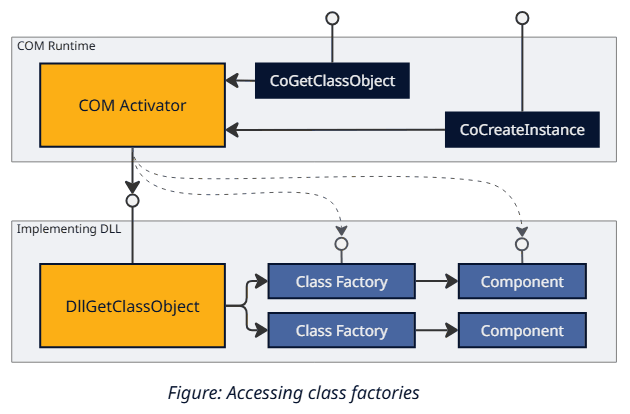
COM loves interfaces. It uses interfaces even when constructing objects. Want a new object? Ask IClassFactory. Yet, eventually, this approach runs into a chicken-and-egg problem, as we still need to locate the class object itself. The documented API for doing so - CoGetClassObject - has identical reasons for refusing to work as CoCreateInstance(which we will discuss in the next part of the series), so we need to manually reconstruct its functionality. Luckily, it consists of two main steps:
- Finding the component's registration information (such as the implementing DLL) in the registry, based on the specified CLSID.
- Loading this DLL and invoking its
DllGetClassObjectexport:
HRESULT
WINAPI
DllGetClassObject(
    _In_  REFCLSID rclsid,
    _In_  REFIID riid,
    _Outptr_ LPVOID *ppv
    );
Looking up component registration is a straightforward and well-documented process, at least assuming we have access to the registry. It is also somewhat redundant when dealing with pre-installed and bring-your-own components, as we should know (and thus, can hardcode) their location in advance. Once we know the correct DLL, LoadLibrary and GetProcAddress (or LdrLoadDll and LdrGetProcedureAddress, if you prefer Native API) are all we need to locate DllGetClassObject, which, in turn, exposes IClassFactory that can instantiate components without COM initialization. Assuming, of course, nothing breaks in the component's code in the process.
On a side note, class objects can also expose
IParseDisplayNamethat powersCoGetObjectandBindMoniker, plus any number of custom interfaces to compensate forIClassFactory's inability to pass extra parameters to instance constructors.
It's worth pointing out that manually calling DllGetClassObject is not only a known technique, but some Microsoft components are explicitly designed to support it. An example is the MSDIA library, which ships with a function doing precisely that.
Re-implementing RoActivateInstance
WinRT component activation follows a conceptually similar path, with minor implementation differences. Here is a table for translating COM constructs into their WinRT counterparts:
| COM | WinRT | |
| Base interface | IUnknown | IInspectable |
| Factory interface | IClassFactory | IActivationFactory |
| Class identification method | CLSID | HSTRING |
| Initialization routine | CoInitializeEx | RoInitialize |
| Instance creation routine | CoCreateInstance | RoActivateInstance |
| Factory creation routine | CoGetClassObject | RoGetActivationFactory |
| Classes registry key | HKLM\SOFTWARE\Classes\CLSID | HKLM\SOFTWARE\Microsoft\WindowsRuntime\ActivatableClassId |
| DLL entry point | DllGetClassObject | DllGetActivationFactory |
Just like with classical COM, we first want to replace RoActivateInstance with RoGetActivationFactory and IActivationFactory::ActivateInstance. To get the activation factory without invoking RoGetActivationFactory, we need to look up the implementing DLL in the registry, load it, and call the designated export - DllGetActivationFactory. Notice that this time, the export's name and prototype change to the following:
HRESULT
WINAPI
DllGetActivationFactory(
    _In_  HSTRING activatableClassId,
    _Out_ IActivationFactory **factory
    );
The rest of the process follows COM's footsteps, just with more string manipulation. As for looking up WinRT class registration information, it is less documented but about equally as simple. Each class ID has a corresponding key under HKLM\SOFTWARE\Microsoft\WindowsRuntime\ActivatableClassId containing a collection of values describing who implements it (DllPath, Server, RemoteServer, as per the activation type), the threading model it expects, and so on.
Remarks on reliability
These manual invocation methods hypothetically allow components to be used without prior COM/WinRT initialization. Of course, we wouldn't recommend relying on this behaviour. Many things can go wrong: the code can attempt to identify the current apartment, use marshalling, or call any of the other dozens of APIs that expect the base COM facilities to function, and then fail spectacularly. After all, we are violating the rules. Even libraries that support manual DllGetClassObject invocation do not necessarily guarantee fully COM-less operation. Still, a surprising number of in-process components manage to operate correctly under these conditions. But it certainly would be better to explore other ways to bypass the initialization capability check, even if only to make 3rd-party components happier with a working COM runtime. Also, the idea breaks down with out-of-process components since we cannot merely load them as DLLs.
The incapable check
The second, more direct attack vector against the initialization capability check relies on its extremely straightforward implementation. We can observe that when combase!_CoInitialize (the function behind CoInitialize, CoInitializeEx, and RoInitialize) detects that the current process runs in LPAC, it invokes RtlCheckTokenCapability:
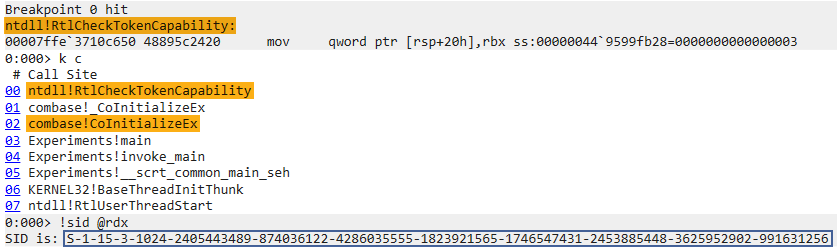
The screenshot above shows the corresponding stack trace and decodes the second parameter passed to RtlCheckTokenCapability as a SID. In general, reconstructing a capability name from its SID (i.e., inverting a SHA-256 hash) is a problematic task. Luckily, this time we know the input and can verify it by passing the lpacCom string to RtlDeriveCapabilitySidsFromName and comparing the result.
Under the hood, RtlCheckTokenCapability prepares a security descriptor with the specified capability SID and requests an access check against it (which, in turn, consults with the caller's token). While the access check itself executes in the kernel, the request to perform one comes from our process, demonstrating a textbook definition of client-side protection. All we need to bypass it is to fake the result, say, by patching the function or installing an IAT hook. This trick allows CoInitializeEx to succeed without the lpacComcapability.
Continuation
Perfect. Does that mean patching the initialization logic can solve all our problems? Not quite yet. Here are a few reasons why:
- For starters, we still have a loose end related to
registryRead.CoCreateInstanceandRoActivateInstanceneed to look up the components' information, and security descriptors on the corresponding keys require LPAC callers to have theregistryReadcapability. If we have it - sure, this bypass is enough to make in-process instantiation work. Otherwise, part three of this series will explore how to makeCoCreateInstancework without the registry. - Secondly, the out-of-process scenario still fails (with access denied, even with
registryRead). We'll have to investigate the reasons further in the next part. - Finally, we still owe you a feature that bypasses the check out-of-the-box. So stay tuned for the next blog post in the series.